Canvas Draw for Mac5.0.2.51
Publisher Description
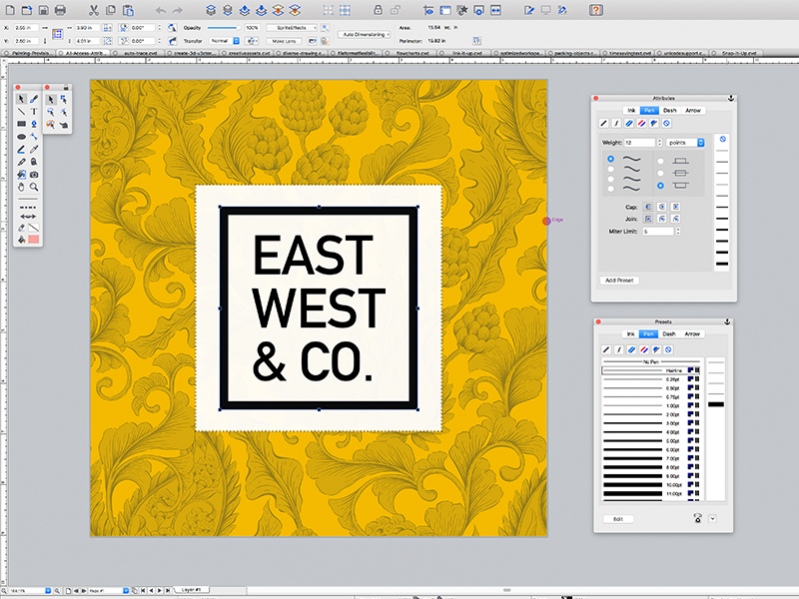
Visualize your workflow with a diverse content creation tool able to combine adaptable text, image, object, and effect elements in a single document. Canvas Draw 5 services the creation of mechanical documentation, including assembly, maintenance, and repair instructions. Rapidly illustrate complicated procedures, processes, and workflows with the convenient application of built-in templates and over 2000 symbols. Designed for business professionals and creatives alike, Canvas Draw 5's comprehensive set of vector object and advanced raster image editing tools make it easy to take your operation to the next level.
Visual Communication for Professionals
Quickly create, customize, and add to tables with no fuss or learning curve. Copy data directly into your tables from Excel or other sources. Tailor cell borders, size, and look and feel to your needs, or make them invisible.
Branding & Vector Illustration
Canvas Draw makes your creative marketing efforts easy and dynamic with an integrated design environment. With an extensive collection of symbols, a wide range of file compatibility, and advanced editing tools, you can paint, draw, select, retouch, color correct, and clone your way to seamless designs, typography, and branding.
Real Estate &
Computer-aided Design
Communicate the characteristics of a space by blowing up specific areas, creating 3D vector and text objects, tracing out features and converting them to paths, and much more. Reach your audience by creating composites, touching up images, using transparency effects, and a variety of industry-leading tools and filters.
Blueprints & Technical Illustration
Create blueprints, floor plans, scale drawings, architectural designs, and other technical drawings with measured definitude and placement. Snap objects into exact positions relative to each other, draw from center points, define scale, systematically align, display sizes, add labels, callouts, or comments, create flowchart diagrams.
About Canvas Draw for Mac
This Editors program is available in English. It was last updated on 29 September, 2026. Canvas Draw for Mac is compatible with the following operating systems: Mac.
The company that develops Canvas Draw for Mac is ACD Systems International Inc.. The latest version released by its developer is 5.0.2.51. This version was rated by 4 users of our site and has an average rating of 2.3.
The download we have available for Canvas Draw for Mac has a file size of 220.2 MB. Just click the green Download button above to start the downloading process. The program is listed on our website since 2019-01-30 and was downloaded 499 times. We have already checked if the download link is safe, however for your own protection we recommend that you scan the downloaded software with your antivirus. Your antivirus may detect the Canvas Draw for Mac as malware if the download link is broken.
How to install Canvas Draw for Mac on your Windows device:
- Click on the Download button on our website. This will start the download from the website of the developer.
- Once the Canvas Draw for Mac is downloaded click on it to start the setup process (assuming you are on a desktop computer).
- When the installation is finished you should be able to see and run the program.
Program Details
System requirements
Download information
Pricing
Version History
version 5.0.2.51.0
posted on 2019-01-30
New View (Layout | Views | New View) will ignore the current page and layer position by de-selecting the Remember Current Page and Layer checkbox when it is saved
Fixed security vulnerability related to some image import
Fixed a crash triggered by opening a very large CVD file over 2 GB
And more
version 5.0.1.37
posted on 2018-08-21
Visualize your workflow with a diverse content creation tool able to combine adaptable text, image, object, and effect elements in a single document. Canvas Draw 5 services the creation of mechanical documentation, including assembly, maintenance, and repair instructions.
version 4.0.2.60
posted on 2018-02-21
PDF paste format is now supported.
Thumbnail preview of CNV files is now supported in Finder.
Open when Digital Camera is plugged in checkbox added to Camera & Scanner dialog.
Improved performance of Space Bar + drag for panning at zooming factors of over 3200%.
And more improvements and fixes!
version 4.0.1.39
posted on 2017-09-12
Floating palettes can be collapsed or expanded.
Recently-used inks listed in the Presets palette can be cleared on demand by clicking the Clear button below the list.
Toolbar can be hidden in non-Full Screen mode by selecting Window | Hide Toolbar.
Bug fixes.
version 4.0.0.28
posted on 2017-06-22
Presentation documents are supported.
Slide show with 4 transitions is now supported for Presentation documents (Layout | Slide Show...)
The Type palette is now available (Text | Type...).
Tighten Fine Kerning, Loosen Fine Kerning, and Configure Fine Kerning commands are added to Text | Kerning
version 3.0.5.274
posted on 2017-01-10
The speed of putting large text objects into Edit mode is optimized.
Using the Wand tool on a large image is optimized.
Multiple objects copied on one page can be placed exactly on another page by [shift]+click Paste under the Edit menu.
version 2.0.186
posted on 2015-11-17
New Update! Canvas Draw 2 for Mac comes loaded with tools and techniques that allow you to easily create marketing or business materials, as well as creative content, printable drawings, and shareable PDFs. More work area customization and new tools are just some of the updated features.
